The complete digital operating system for schools

Everything your school needs. One intelligent platform.

Manage academics, finances, staff, students, parents and school operations from one connected platform. Semper Ed keeps your school running, even when the internet doesn't.

  • ₦1,000 per student, per term
  • Free under 50 students
  • First term free
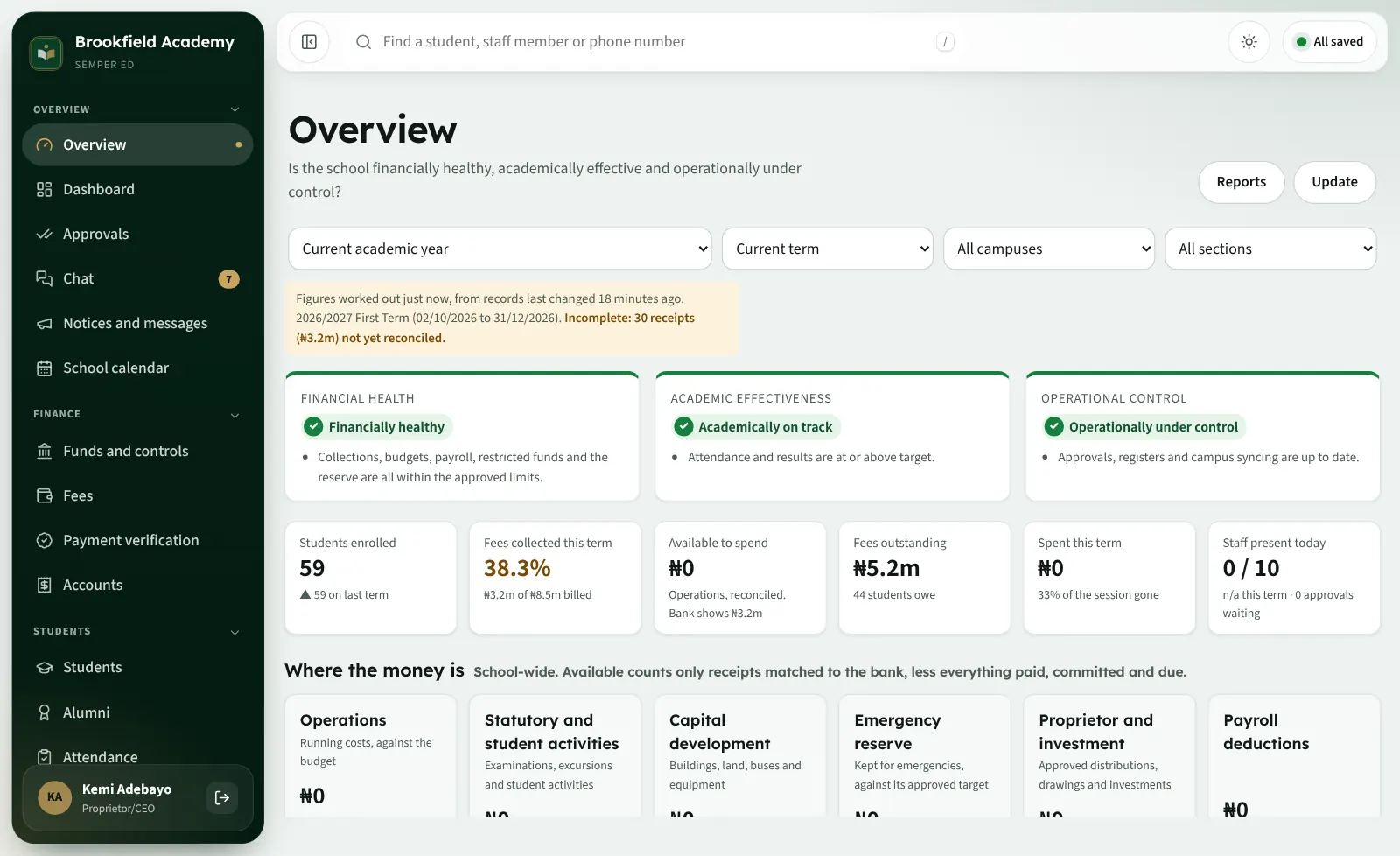
The proprietor's overview: financial health, academic effectiveness and operational control, with students, fees collected and money in each fund
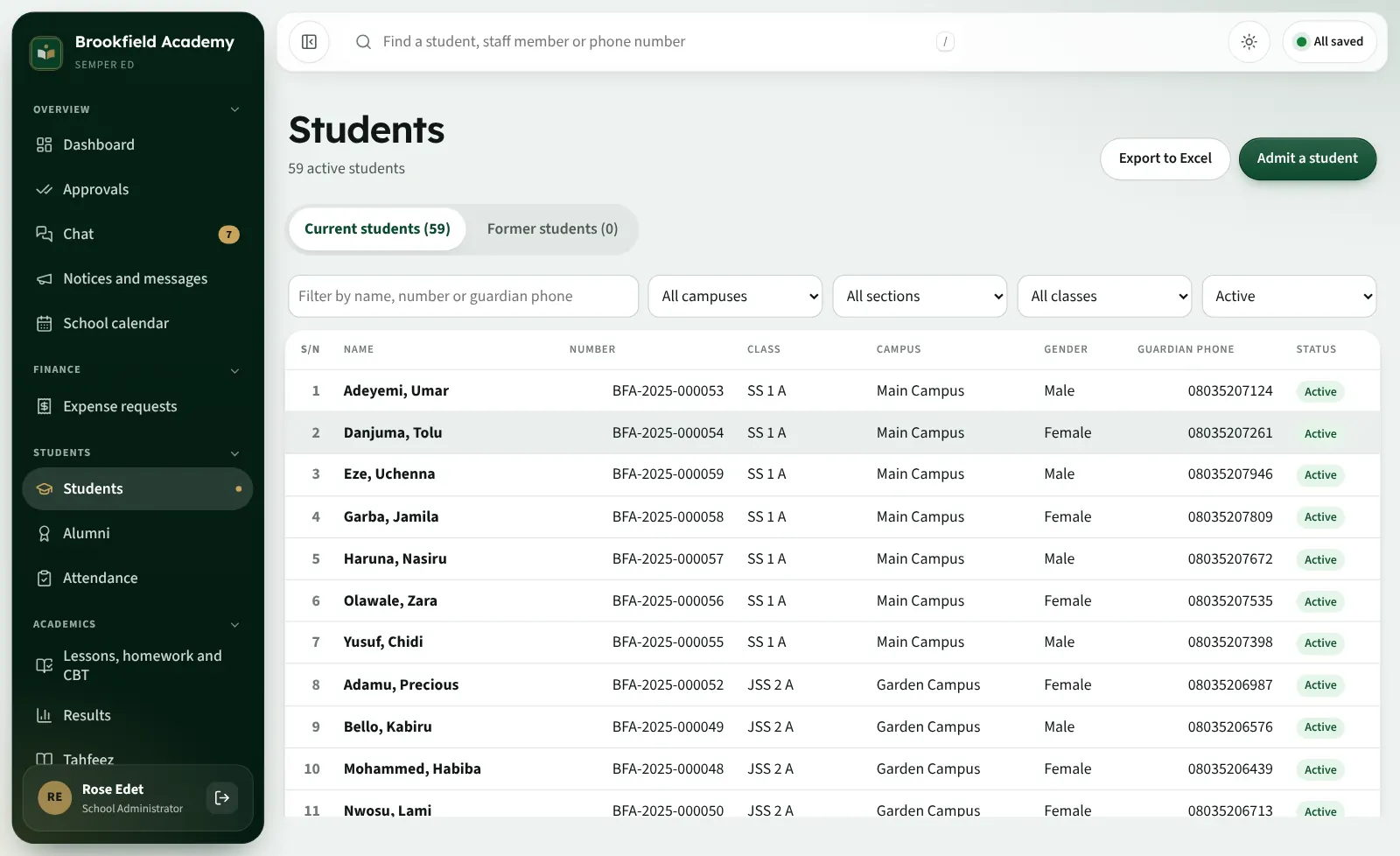
Students enrolled59
Fees collected this term38.3%
Fees outstanding₦5.2m
Class average, Primary 5 A69.63%
RegistersAll saved
Figures from Brookfield Academy, our demo school with made-up students and staff.
23modules in one system
4portals: leaders and office, teachers, parents, students
₦1,000per student, per term, for the whole suite
Offlineregisters, marks and payments keep working without a signal

Product tour

See Semper Ed working, before you sign up

A one-minute tour of a school day, filmed on the real app with our demo school. Then click through the screens.

Semper Ed in one minute (no sound needed)
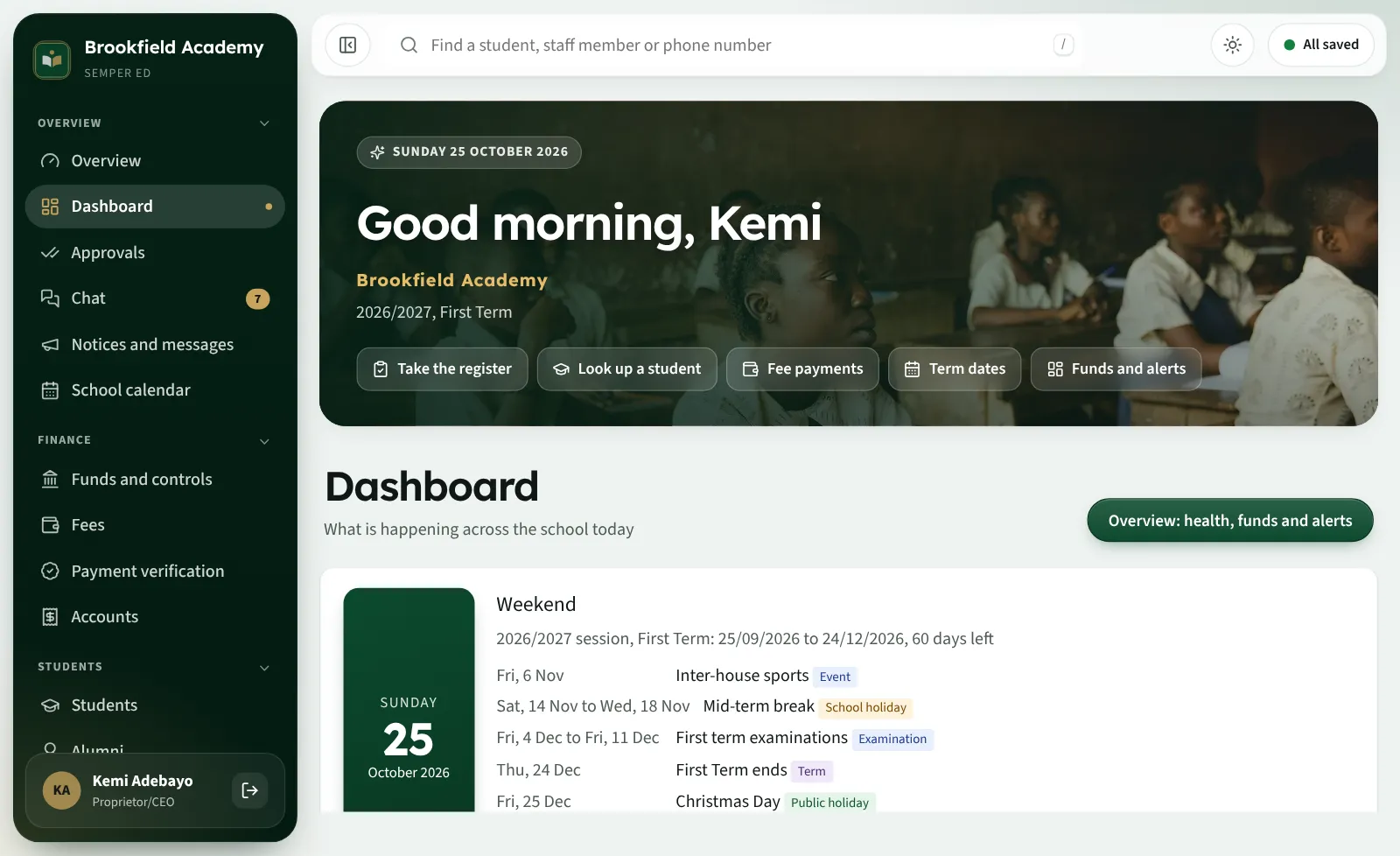
The dashboard: today, the term's dates and quick links

Opens on today: the term's week, what is coming up, and one tap to the register.

Get your own demo access

Features

Every part of the school, connected

Each list shows only what works today. Items marked Coming are being finished.

A · Academic management

From admission to graduation

  • Student records and documents
  • Admissions, online and in the office
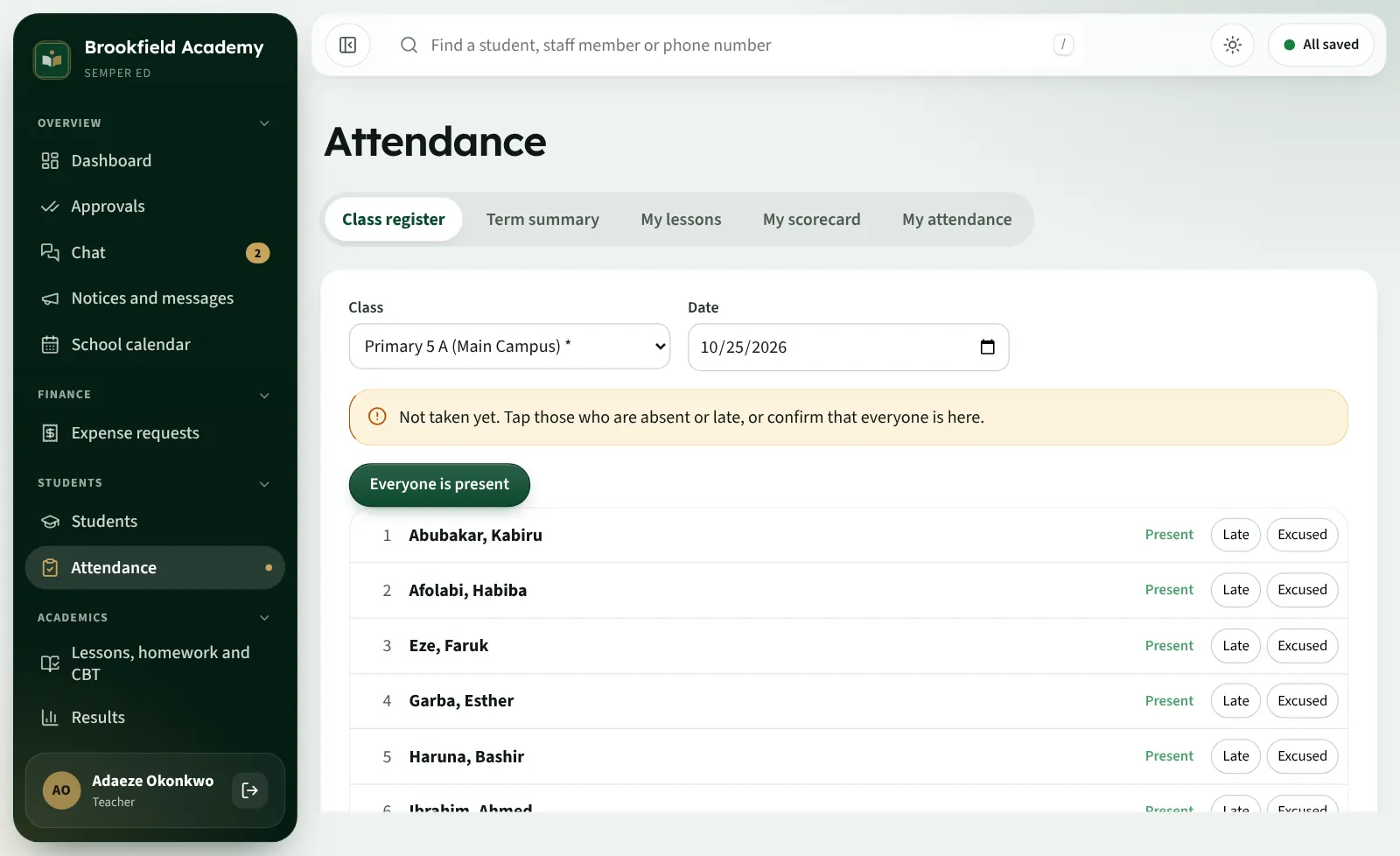
  • Class and staff attendance
  • Examination timetables
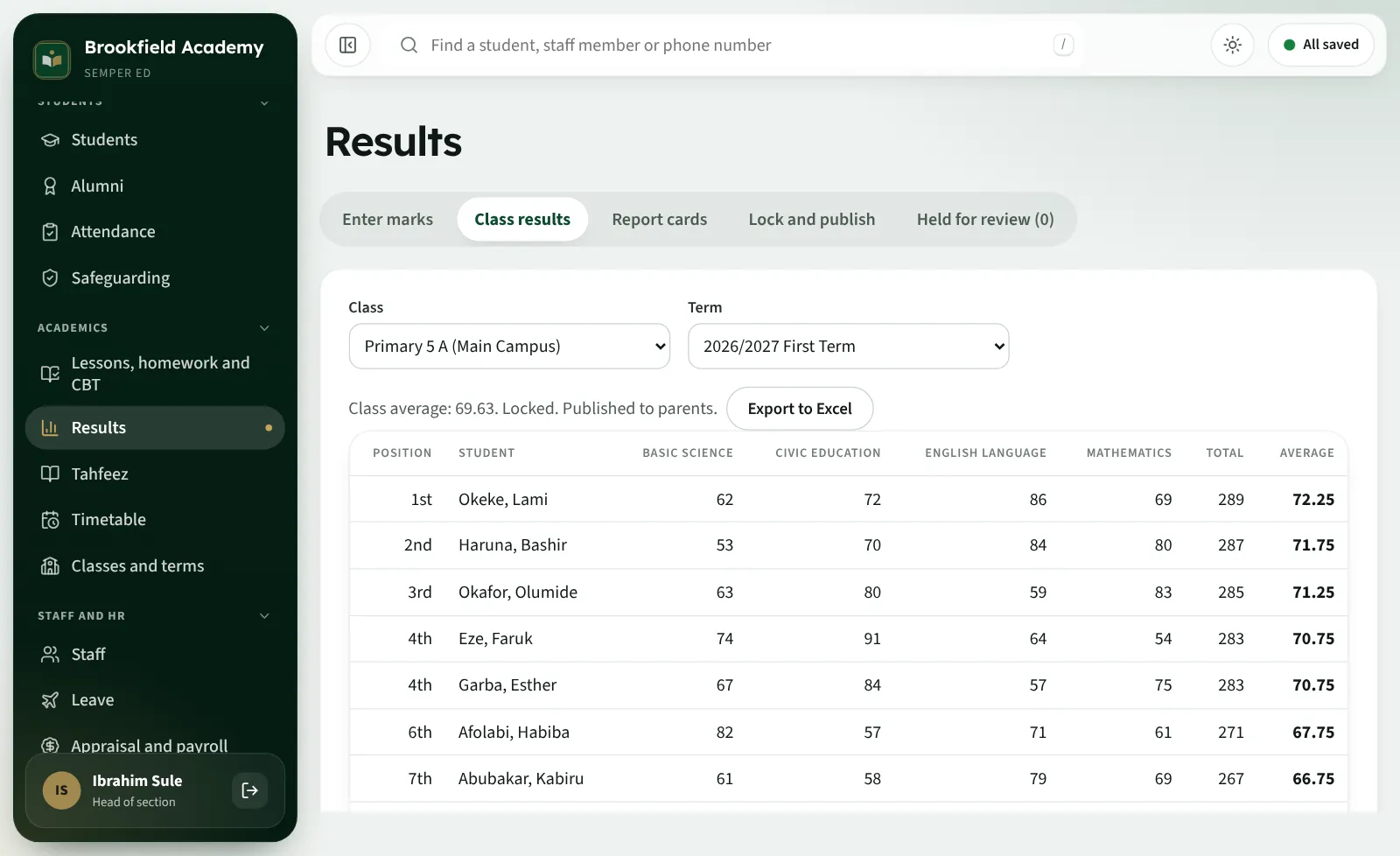
  • Results processing and positions
  • Report cards with comments
  • Class result sheets (broadsheets)
  • Timetables without clashes
  • CBT that marks itself
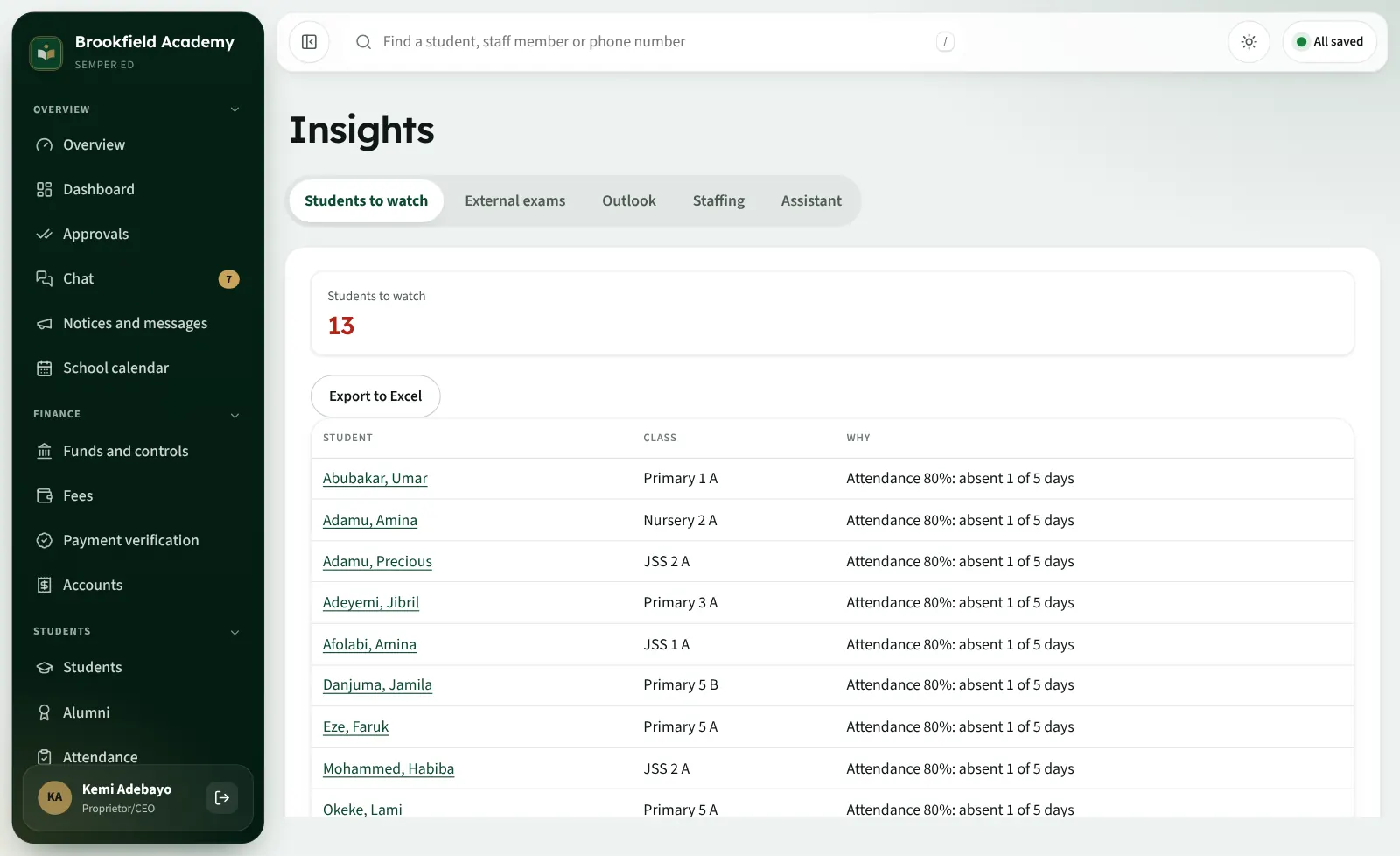
  • Academic analysis and students to watch
  • Promotion at the end of the session
  • Graduation and alumni
Class results with positions
B · Financial management

Every naira accounted for

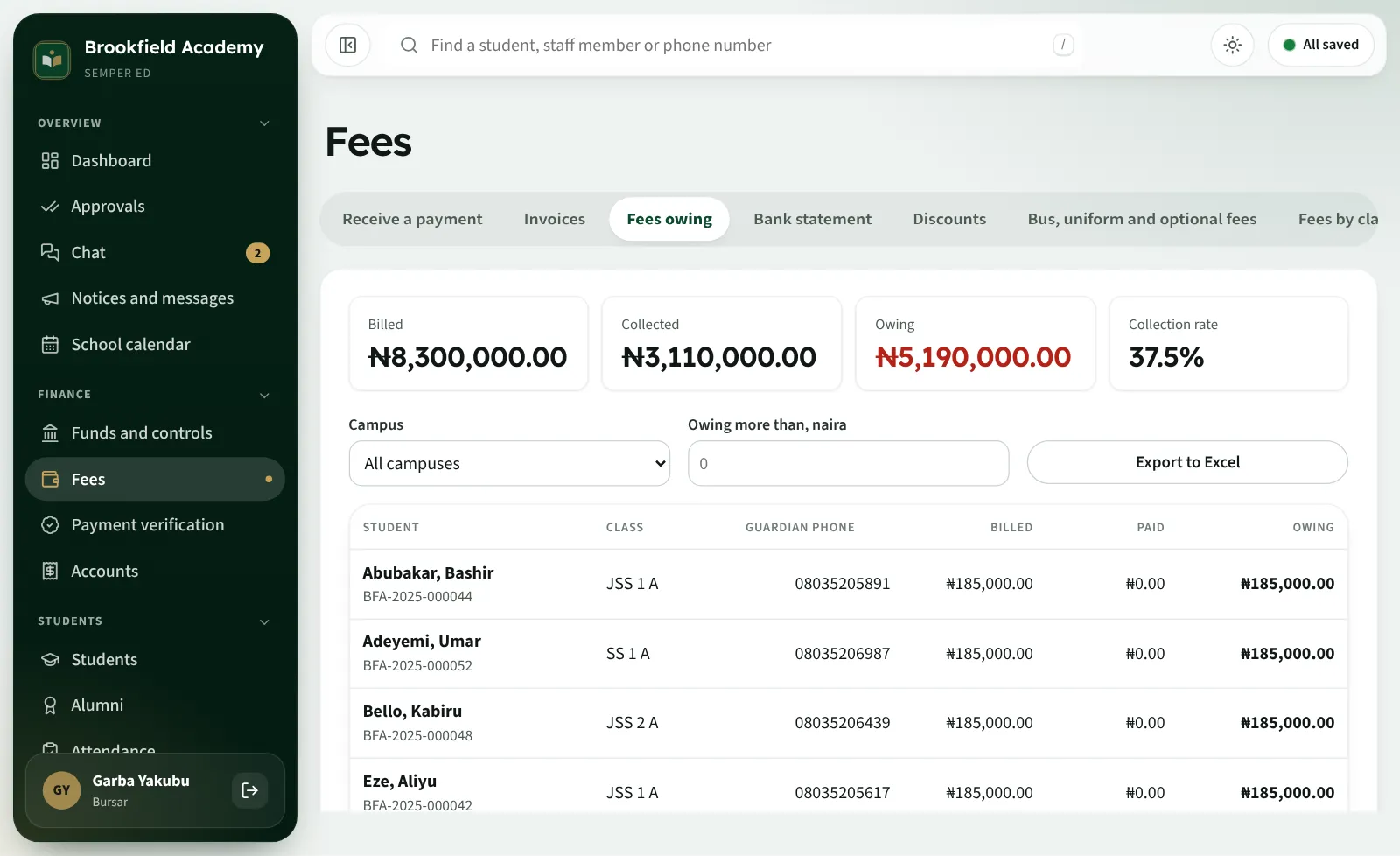
  • School fee billing for the term in one action
  • Payment recording and part payments
  • Numbered receipts
  • Fees owing, by class and parent
  • Bank transfers checked against the bank
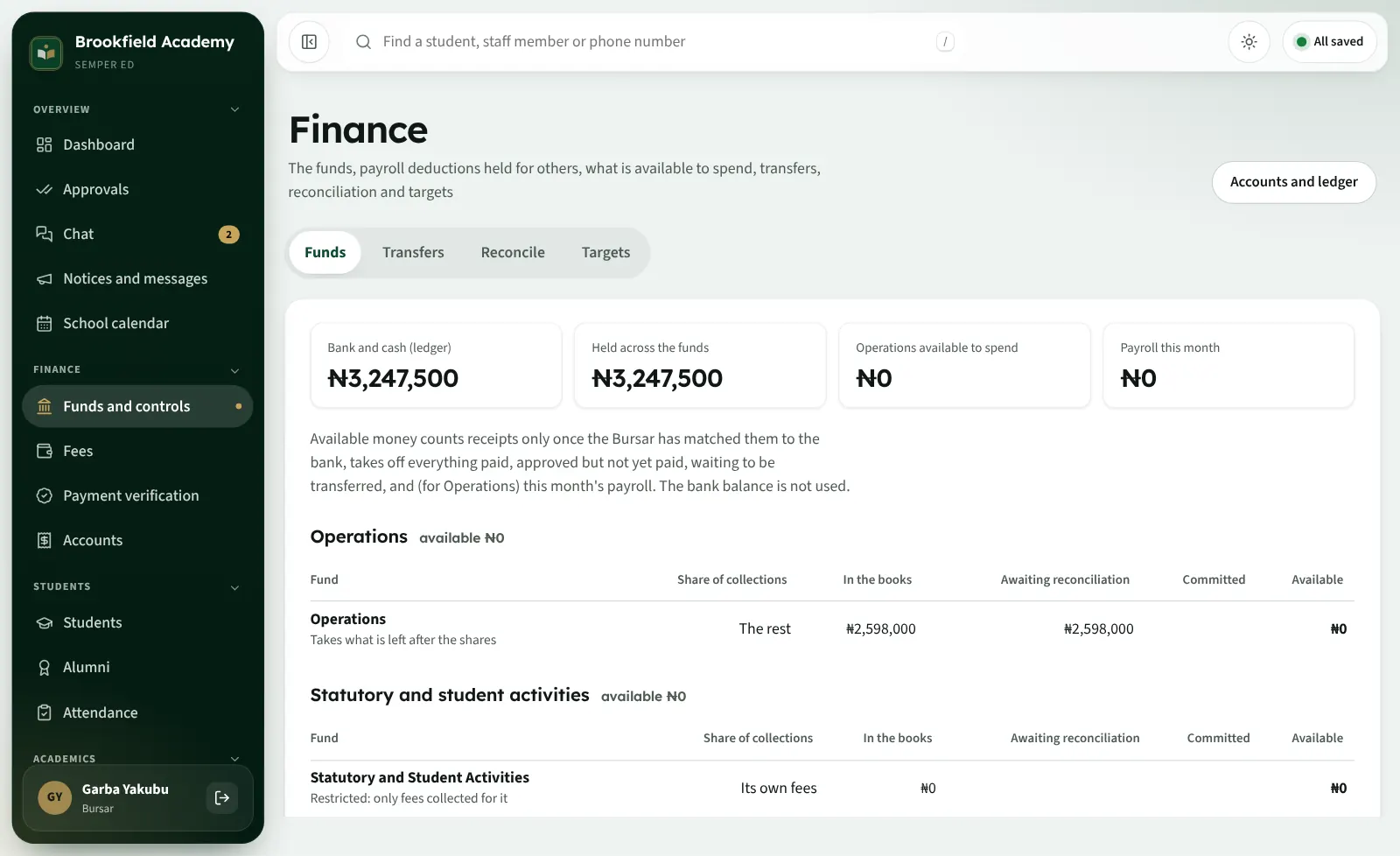
  • Income and expenditure
  • Budgets and funds
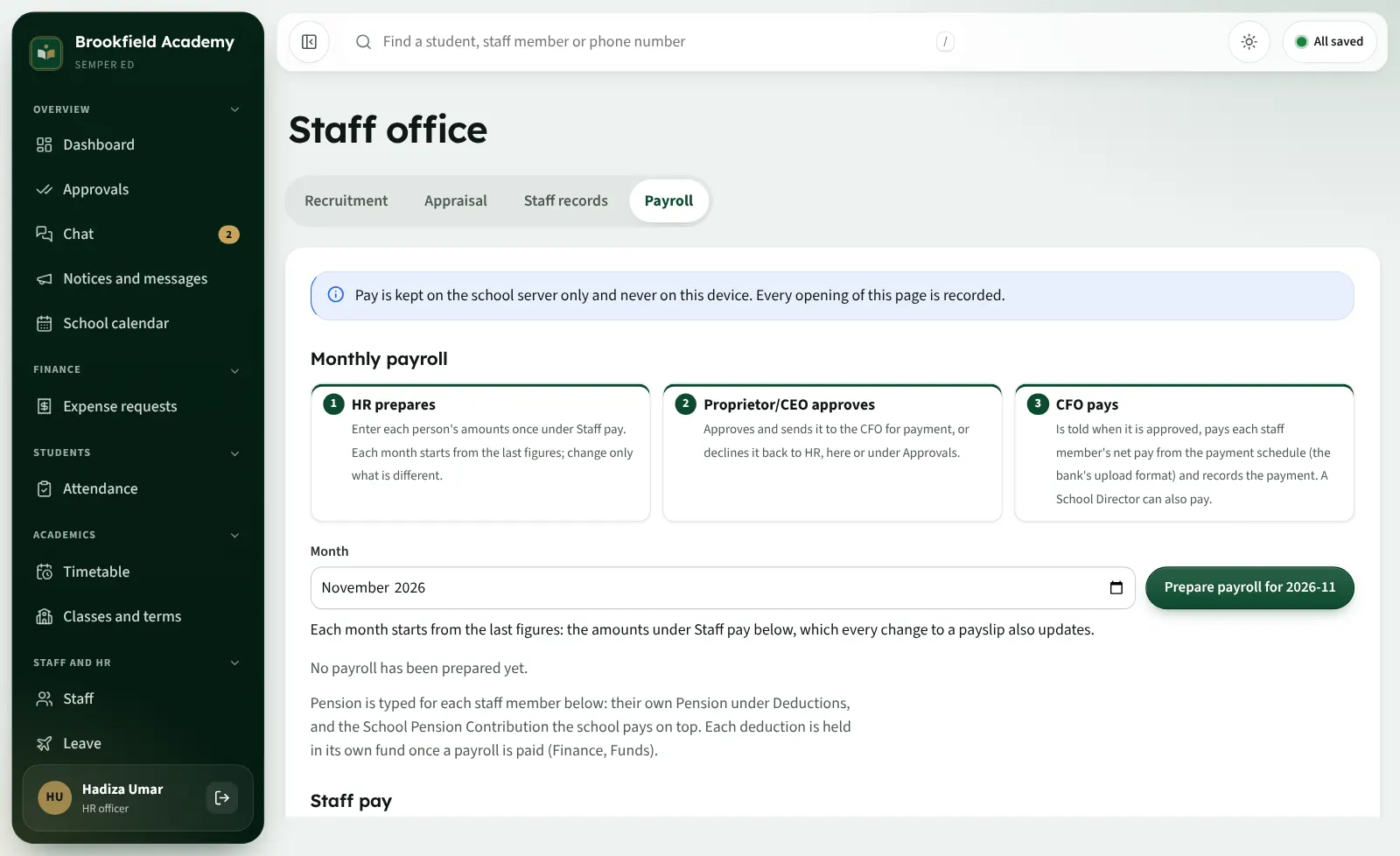
  • Payroll, payslips and the bank's schedule
  • Financial reports and month-end close
  • Approvals with limits and time
  • Each campus's figures, and the whole school's
  • Deduction accounts reconciled to the bank
Funds and controls: money in each fund, reconciled to the bank
C · Staff and HR

The staff office, without the paper

  • Staff records and files
  • Recruitment and onboarding
  • Staff clock-in by QR poster
  • Payroll: HR prepares, the proprietor approves, the CFO pays
  • Leave requests and approval
  • Appraisal
  • Section reports for heads of section
  • Staff ID cards and letters
Payroll: HR prepares, the proprietor approves, the CFO pays
D · Communication

Families and staff in one conversation

  • Parent portal
  • Teacher tools on any phone
  • Student portal (secondary school)
  • Staff room and staff messaging
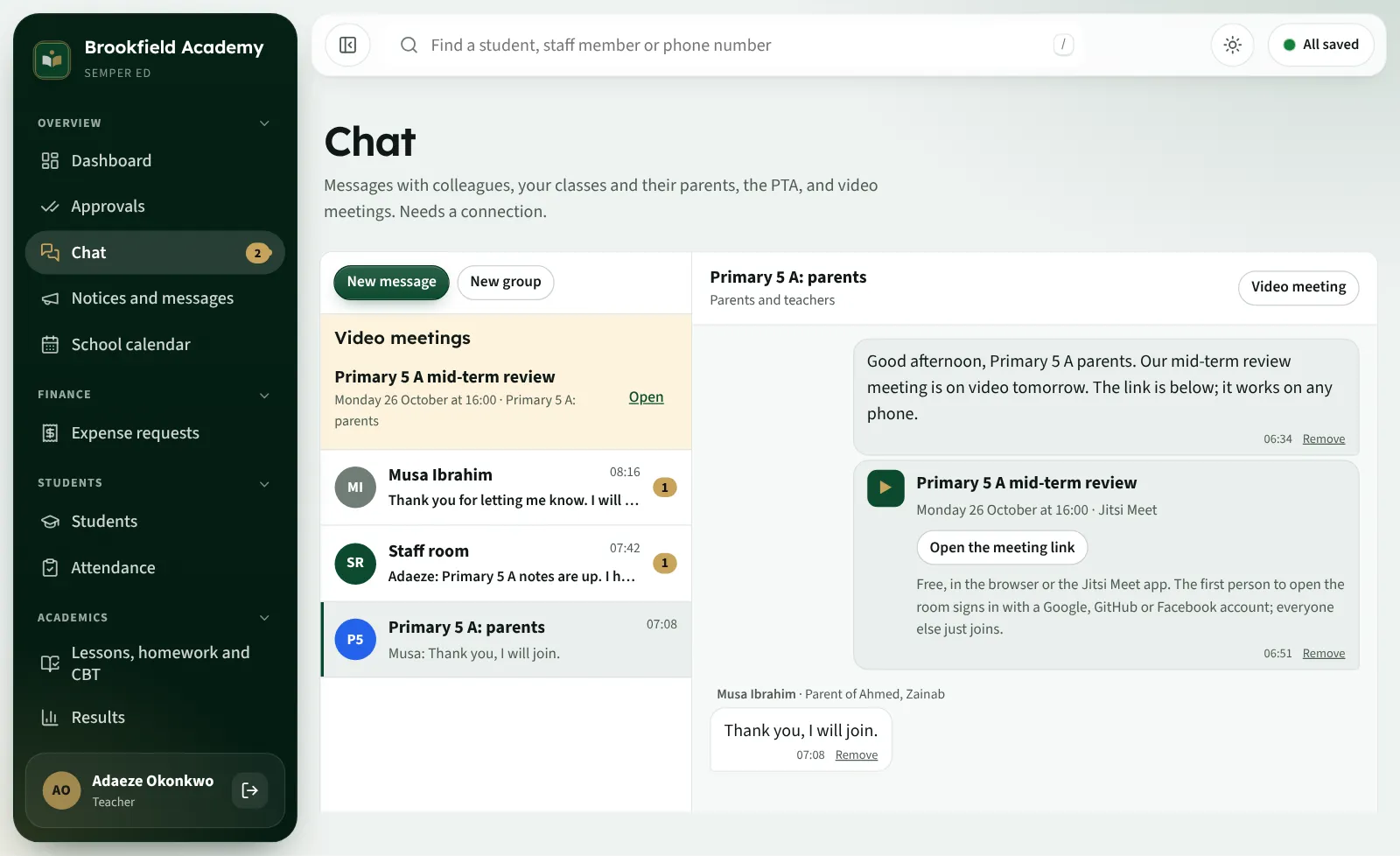
  • Parent and teacher chat
  • PTA group
  • Video meetings in one click
  • Text messages, WhatsApp and email
  • Phone notifications Coming
Chat with a class's parents, and a video meeting
E · School operations

The rest of school life

  • Transport: vehicles, routes and riders
  • Library: books and loans
  • Stores and stock
  • Health records, kept private
  • Asset register
  • Calendar, events and activities
  • Maintenance and facilities requests
  • Boarding: hostels and rooms
  • Tahfeez and Islamiyyah progress
The student list across campuses
F · Reports and insight

Know where the school stands

  • The proprietor's overview
  • Academic analysis
  • Financial position by fund
  • Attendance reports
  • Weekly and monthly section reports
  • Comparisons by campus and section
  • Everything to Excel
  • An AI assistant for whole-school figures
Insights: students to watch, outlook and staffing

Four portals

Everyone sees what they need, and nothing more

The office dashboard

Leaders and office

Finance, staff, administration, approvals and reports.

A teacher's class register

Teachers

Registers, marks, lesson notes, timetable and chat with parents.

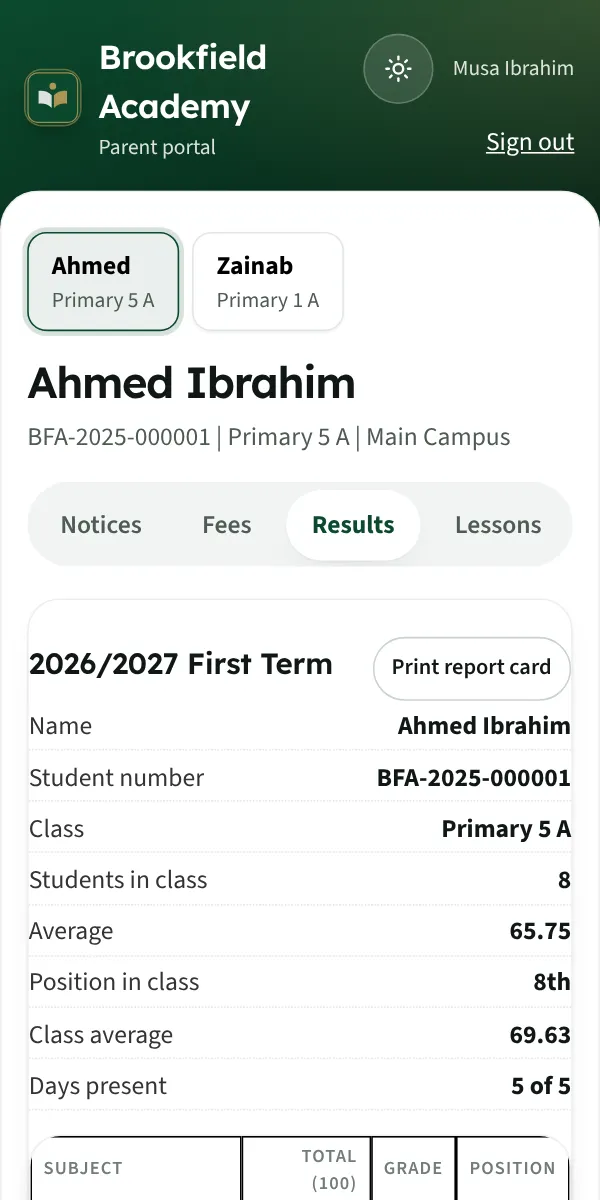
The parent portal on a phone

Parents

Results, attendance, fees and receipts for every child. For nursery and primary, the parent's account does the homework and tests too.

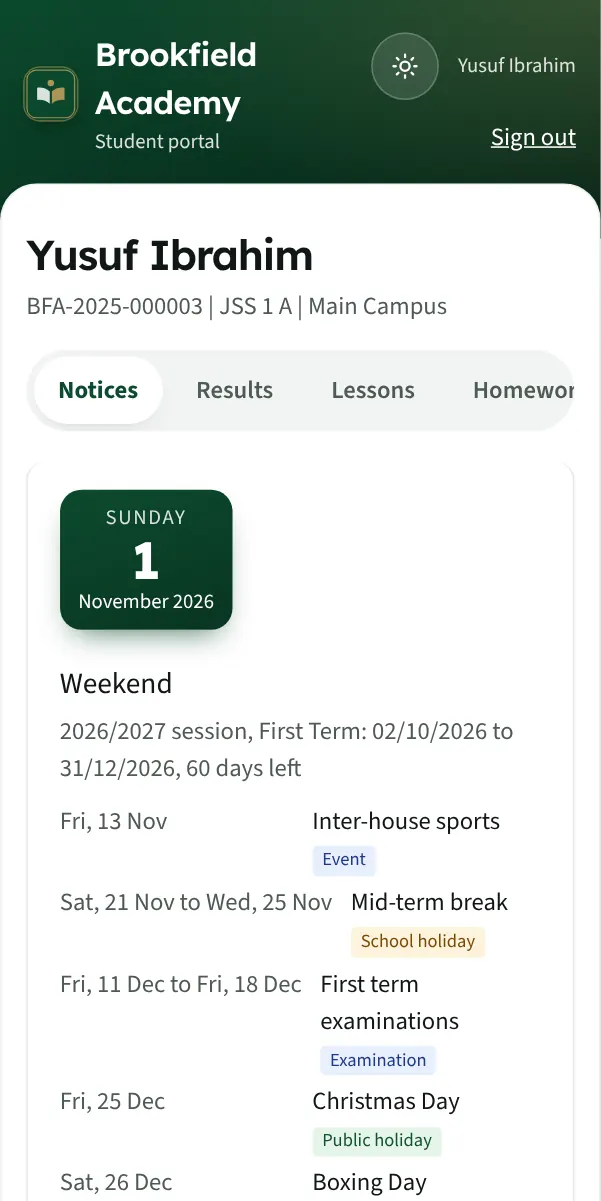
The student portal on a phone

Students

Secondary school students: results, lesson notes, homework, tests and school news.

Proprietor command centre

Control, transparency and accountability, on one screen

The overview answers three questions every morning: is the school financially healthy, academically effective and operationally under control?

  • Students enrolled, by campus and section
  • Fees billed, collected and owing
  • Money in each fund, matched to the bank
  • Income and expenditure
  • Payroll and deductions
  • Campus and section comparisons
  • Academic performance and students to watch
  • Registers, lessons and approvals waiting
See it as a proprietor
The proprietor's overview

G · Offline-first technology

Your school doesn't stop when the internet does

Staff phones and computers keep a copy of the records they are allowed to see. Work done without a signal is saved on the device, then sent to the school's cloud when the connection returns.

School device, then local copy, then internet, then cloud School devicephone, computer Saved locallyworks with no signal Internet returnsor the campus hub School cloudin step, backed up

Works offline

Class registers, marks, fee payments, records and notes for staff who have opened the app before.

Catches up on its own

Changes are sent in the background when the connection returns, in the order they were made.

Nothing overwritten

Each change is checked when it arrives, so two people's work is not lost, and every change is on record.

Needs a connection

The parent and student portals, chat, video meetings, CBT and payroll. An optional campus hub keeps a whole campus working through an outage.

School groups and government

One view across many schools

Semper Ed runs every school at its own address with its own walled-off records, so one owner, board or ministry can see across them without mixing them.

Multi-campus schools

Each campus's registers, fees and staff, compared side by side, with officers limited to their own campus.

Available

School groups

Several schools on one platform, each with its own address and branding, set up and supported by our team.

Available

Government edition

A State Command Centre for ministries, SUBEB and LGA officers: every school as dated figures, the school census and supervision visits.

Demonstration

The government edition can be seen today in a guided demonstration. Ask for access and choose Government.

How it works

We set it up with you. Free.

  1. Talk to usTell us your campuses, sections and classes, and how you work today.
  2. Send your recordsFill our Excel templates, or send the sheets you keep. We bring in records on paper too.
  3. We set it upYour school's own address, branding, classes, fees and every staff and parent account.
  4. Train and go liveFree online training for the office, teachers and bursary; training at your school is priced by location.

Pricing

One simple price for the whole suite

No modules to buy, no set-up fee, no charge for text messages or support.

Small schools

Free

for schools under 50 students

  • The whole suite
  • Free set-up and online training
  • Free support
Get started
Most schools

Every school

₦1,000

per active student, per term

  • Every feature, every portal
  • Your first term free
  • Free set-up and records import
  • Free online training and support
  • Text messages and apps included
Get started

Groups and government

Let's talk

school networks, many campuses, ministries and boards

  • One view across schools
  • Training on site
  • The government edition
Contact us

What your school would pay

Per term
₦300,000
Per session
₦900,000
Your first term
Free

Only training at your school is charged, by location. Ask us.

Questions

What schools ask us

Something else? Write to support@semperfi.uk.

What is Semper Ed?

A complete school management system: admissions, records, attendance, results, CBT, fees, accounts, payroll, HR, portals for parents and students, chat and video meetings. It is made by Semper Fidelis Holding and runs on phones, computers and the web.

How does onboarding work?

Our team sets your school up for you, free: your own address (yourschool.semperfi.uk), branding, campuses, classes, fees, and every staff and parent account. Then we train your staff online.

Can we bring our existing student records?

Yes. Send the Excel sheets you keep or fill our templates; every row is checked before anything is saved. Records kept only on paper we type in for you.

Can teachers use their phones?

Yes. Teachers take registers, enter marks, write lesson notes and chat with parents from any phone, and the app installs from the browser. Store apps for Android and iPhone are being finished.

Does Semper Ed work offline?

Registers, marks, payments and records keep working on staff devices without a signal and catch up when it returns. The portals, chat, video meetings, CBT and payroll need a connection. A campus hub can keep a whole campus going through an outage.

Can we manage several campuses?

Yes. Each campus has its own classes, staff and fees; leaders see all of them and compare them, and officers can be limited to their own campus.

How are school fees managed?

Bill the term in one action, with discounts. Record payments in full or in part, issue numbered receipts, check bank transfers against the bank, and see who owes, by class and parent. Fees go straight to the school's own bank account; Semper Ed never holds them.

Can parents see their children's information?

Yes. One parent account covers every child: results and report cards when the school publishes them, attendance, fees, receipts and notices, and chat with teachers.

Is our data secure?

Each school's records are walled off inside the database. Health and safeguarding notes are encrypted, every change is recorded, backups are encrypted every night and restore-tested, and our own support accounts cannot open children's health records without the proprietor's permission.

Can we export our records?

Yes. Lists and reports download to Excel, and we give you a full export of your records whenever you ask.

What happens if we stop subscribing?

Your records are yours. Ask us and we give you a full export before your school's address is closed.

What support do we get?

Free support by email at support@semperfi.uk and by phone or WhatsApp on +234 708 646 9392, with training videos and a handover guide for your staff.

How much does it cost?

₦1,000 per active student, per term, for the whole suite. Schools under 50 students use it free, and every school's first term is free. Only training at your school is priced, by location.
Request a demo

See it working, as any role

Choose a time and we will walk you through it, then send your personal access to the demo school: Brookfield Academy, full of made-up students, staff, fees, results and conversations. Nothing you do there sends a real message or takes a payment.

  • Proprietor
  • School administrator
  • Head of section and teacher
  • Bursar and HR
  • Parent and student
  • Government officials

Already have a code? Open the demo

Book your demo

Which demo?

We reply within one working day to confirm the time and send your personal access code.

Get started

Bring your school onto Semper Ed

Tell us about your school. We reply with the next steps, set your school up, and your first term is free.

info@semperfi.ukNew schools, groups and government

support@semperfi.ukHelp for schools already using Semper Ed

+234 708 646 9392Phone and WhatsApp

Already with Semper Ed? Sign in to your school

The computer apps

For the office, bursary and staff computers. They open your school, keep working when the internet drops, and update themselves. Phones need no download: open your school's address and add it to the home screen.

Installing for the first time
  • Windows: open Semper-Ed-Setup.exe. If Windows says it protected your PC, choose More info, then Run anyway.
  • Mac: open Semper-Ed.dmg and drag Semper Ed into Applications. The first time, Control-click it and choose Open.
  • When it opens, enter your school's address, then sign in as usual.

About us

Semper Ed is made by Semper Fidelis Holding, a company working in ICT, smart surveillance and solar power, with an office in Kano and clients across Nigeria. We built Semper Ed with our pilot schools, for real Nigerian school days: unreliable power and network, nursery to senior secondary, Islamiyyah and Tahfeez, and many campuses under one owner.